TL;DR: You can build a genuinely good home office desk setup from AliExpress for under $100 — here's exactly how, with every item tested.
Why build your desk setup from AliExpress?
If you've ever priced out desk accessories on Amazon, you know how fast it adds up. A monitor light bar alone can run $40-60 for brand names. Multiply that across a desk mat, laptop stand, USB hub, and cable management, and you're looking at $200+ easy.
AliExpress sells the same (often literally identical) products for 50-70% less. The catch? Shipping takes longer and you need to know what to look for. That's what this guide is for — I've tested everything listed here at my own desk.
Here's the complete breakdown, totaling under $100.
What's the best budget monitor light bar?
Cost: ~$12 | Read full review
A monitor light bar is the single biggest upgrade you can make to your desk. It eliminates screen glare, reduces eye strain during late-night work sessions, and looks way more premium than a desk lamp.
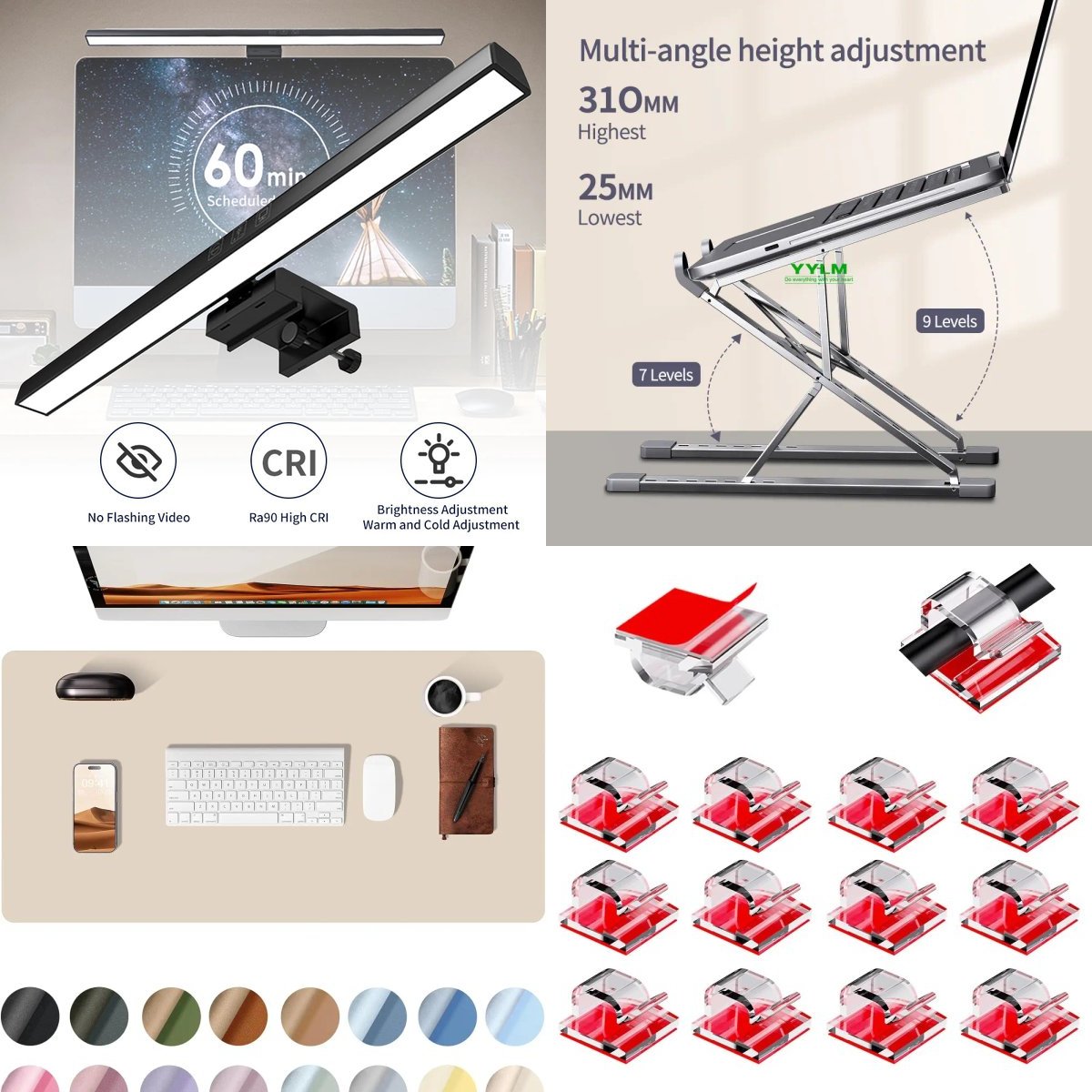
The one I tested has adjustable color temperature (3000K-6500K), USB power, and a touch-sensitive dimmer. Build quality is solid aluminum — it genuinely competes with the Xiaomi and BenQ options at 3-4x the price.
Why it matters: If you only buy one thing from this list, make it this. Your eyes will thank you.
Which desk mat should you get?
Cost: ~$7 | Read full review
A large PU leather desk mat (600×300mm or bigger) transforms your workspace instantly. It protects your desk surface, gives your mouse a smooth tracking area, and just makes everything look more put-together.
The $7 option I tested is waterproof PU leather on top with a non-slip rubber base. It's available in a dozen colors. The stitched edges are clean and show no signs of peeling after weeks of daily use.
Budget tip: Get the 800×400mm size if your desk allows it — the price difference is usually just $1-2 more.
Do you need a laptop stand?
Cost: ~$10 | Read full review
Short answer: yes. Working with your laptop flat on the desk means you're looking down all day, which destroys your neck and posture over time. An adjustable aluminum laptop stand brings the screen to eye level.
The YYLM N8 I tested is foldable, holds up to 17" laptops, and has 6 adjustable height levels. At $10, it's one of the best value-per-dollar items in this entire list. It also doubles as a stand for tablets when you're not working.
Pair it with: An external keyboard and mouse for the full ergonomic setup.
What USB-C hub actually works?
Cost: ~$14 | Read full review
If your laptop only has one or two USB-C ports (looking at you, MacBook Air), a hub is non-negotiable. The 11-port docking station I tested gives you HDMI out, USB 3.0 ports, SD card reader, and PD charging passthrough — all from a single USB-C connection.
Fair warning: not all cheap hubs are created equal. The one I recommend handles 4K@30Hz HDMI output without issues. Some $5 hubs can't even manage stable data transfer.
What to look for: At minimum, get one with HDMI + USB 3.0 + PD passthrough. Skip the ones without HDMI if you ever use an external monitor.
How do you fix messy cables?
Cost: ~$4 + ~$27 | Read full reviews: Cable clips · Cable tray
Cable management is what separates a "desk" from a "desk setup." Two products handle 90% of the problem:
-
Adhesive cable clips ($4 for 50pcs): Stick these along the back edge of your desk to route charging cables, headphone cables, and peripheral wires. Clear silicone clips are nearly invisible.
-
Under-desk cable tray (~$27): This telescopic metal tray mounts underneath your desk and hides your power strip, adapters, and excess cable length. It's the most expensive single item on this list, but also the most transformative for clean aesthetics.
DIY alternative: If you want to save money, just the cable clips + some velcro cable ties ($2) go a long way. The tray is a nice-to-have.
What about a headphone stand?
Cost: ~$8 | Read full review
A headphone stand is technically optional, but if you use over-ear headphones daily, it keeps them off your desk and in one consistent spot. The aluminum hook-style stand I tested mounts to the side of your desk — no extra desk space needed.
It also holds your headset cable neatly, which contributes to the overall clean desk look.
Should you add a ring light for video calls?
Cost: ~$18 | Read full review
If you do regular video calls (Zoom, Teams, Google Meet), a clip-on ring light makes a surprisingly big difference. Bad lighting is the #1 reason people look terrible on camera, and no amount of webcam quality fixes that.
The clip-on ring light I tested attaches directly to your monitor or laptop screen, has 3 color temperatures, and 10 brightness levels. It's USB-powered and foldable for storage.
Who needs this: Remote workers who are on camera daily. If you rarely do video calls, skip it and put the $18 toward something else.
Can you add a monitor riser?
Cost: ~$26 | Read full review
A monitor riser serves double duty: it brings your monitor to a more ergonomic height AND creates storage space underneath for your keyboard, notebooks, or small accessories.
The wooden riser I tested comes in 30/40/50cm widths. It's sturdy enough for monitors up to 27" and has a clean, minimal aesthetic that works with any desk style.
Alternative: If you're using a laptop stand instead of an external monitor, you can skip this one.
What's the total cost?
Here's the full breakdown:
| Item | Cost |
|---|---|
| Monitor light bar | $12 |
| Desk mat (large) | $7 |
| Laptop stand | $10 |
| USB-C hub | $14 |
| Cable clips (50pcs) | $4 |
| Under-desk cable tray | $27 |
| Headphone stand | $8 |
| Ring light (optional) | $18 |
| Total | $82 (or $100 with ring light) |
That's a complete, tested desk setup for under $100. On Amazon, the equivalent setup would easily run $200-250.
What are the best tips for ordering from AliExpress?
A few things I've learned from ordering dozens of desk accessories:
- Check seller ratings: Stick with stores that have 95%+ positive ratings and 1,000+ orders on the specific product.
- Wait for sales: AliExpress runs major sales almost monthly. The biggest discounts hit during 11.11, 3.28, and summer sales.
- Use the app: App-exclusive coupons stack with sale prices. Always check the app before ordering on desktop.
- Choose "Choice" items: Products with the Choice badge ship faster (3-7 days to most countries) and have better buyer protection.
- Order in batches: Combine multiple items in one order window to maximize coupon usage.
For a complete shipping breakdown, check our AliExpress Shipping Guide.
What should you buy first?
If you can't buy everything at once, here's my priority order:
- Monitor light bar ($12) — biggest quality-of-life upgrade
- Laptop stand ($10) — save your neck
- Desk mat ($7) — instant visual upgrade
- Cable clips ($4) — cheap and effective
- USB-C hub ($14) — essential if you need ports
- Everything else as budget allows
Start with items 1-4 ($33 total) and you'll already have a setup that looks and feels dramatically better than a bare desk.
Frequently Asked Questions
Q: Is it safe to buy desk accessories from AliExpress?
Yes, for most categories. Desk mats, stands, cable organizers, and similar accessories are very low-risk purchases. For anything electronic (USB hubs, lights), check seller ratings and reviews carefully. Stick with products that have 1,000+ orders.
Q: How long does AliExpress shipping take?
Standard shipping to most countries takes 7-15 days. Choice items can arrive in 3-7 days. If you're not in a rush, the wait is easily worth the savings.
Q: Are these products really as good as Amazon equivalents?
For desk accessories — honestly, yes. Many AliExpress products are the exact same items sold on Amazon under different brand names, just without the Amazon markup. The main difference is shipping time and return convenience.
This post contains affiliate links. If you purchase through our links, we may earn a small commission at no extra cost to you.